
By Vsurgemedia | Productivity Series
Executive Summary:
You didn’t start a business to become a data entry clerk. Yet, in 2026, the average small business owner spends 40% of their work week on repetitive, low-value tasks—copying leads from email to Excel, creating invoices manually, or cross-posting on social media.
This is the “Grind.” And it is killing your growth.
The solution is not hiring more people; it is Workflow Automation. By connecting your apps (like Gmail, Slack, and Trello), you can build a self-driving business. But with dozens of platforms promising to save you time, which one is right for your budget and tech skills?
This guide provides an unbiased review of the top workflow automation tools small business owners rely on, comparing ease of use, pricing, and the new wave of AI-driven automation.

Part 1: What is a “Workflow” and Why Automate It?
Before buying software, let’s define the goal.
A Workflow is a sequence of tasks that processes a set of data.
- Manual Workflow: You get an email lead -> You open Excel -> You type the name -> You open Gmail -> You type a reply. (5 Steps).
- Automated Workflow: Lead arrives -> Software adds to Excel & sends email instantly. (0 Steps for you).
According to McKinsey & Company, 60% of all occupations have at least 30% of constituent activities that could be automated. For a small business, this translates to reclaiming 15-20 hours a week.
Part 2: Top Workflow Automation Tools Small Business Reviews (2026)
We evaluated the market leaders based on No-Code Ease, Pricing, and Integration Depth.
1. Zapier (The Household Name)
The Verdict: The easiest place to start. If you want to connect App A to App B without thinking, choose Zapier.
- How it works: Uses “Zaps” (If This, Then That logic).
- Pros:
- Ecosystem: Connects with 6,000+ apps. If an app exists, Zapier probably connects to it.
- Simplicity: The UI is incredibly intuitive. Even a non-tech founder can build a Zap in 5 minutes.
- AI Features: “Zapier Central” allows you to teach AI bots to handle tasks.
- Cons:
- Price: Gets expensive quickly. Complex multi-step Zaps require the Professional plan ($29.99/mo starts).
- Linear: Not great for complex branching logic (loops/arrays).
- Best For: Solopreneurs and beginners.
2. Make (formerly Integromat)
The Verdict: The visual builder for power users. It allows you to build complex “Scenarios” that look like mind maps.
- Pros:
- Visual Canvas: You can drag and drop bubbles to create complex logic trees.
- Cost: Much cheaper than Zapier for high-volume tasks.
- Flexibility: Allows deep data manipulation (parsing JSON, aggregating arrays).
- Cons:
- Learning Curve: Steep. It feels like programming with a visual interface. Not for the faint of heart.
- Errors: Debugging a failed scenario can be tricky.
- Best For: Tech-savvy founders and agencies.
3. Pabbly Connect (The Budget King)
The Verdict: A favorite in the Indian and Global SME market because of its pricing model.
- Pros:
- Lifetime Deal: Unlike subscriptions, Pabbly often offers one-time payment options.
- No “Task” Tax: Triggers (the first step) are free and don’t count against your quota.
- Video Tutorials: Excellent library of YouTube guides.
- Cons:
- UI: Less polished than Zapier.
- Integration Count: Fewer apps than Zapier (though growing fast).
- Best For: Budget-conscious small businesses.
4. Bardeen (The Browser Automator)
The Verdict: An AI agent that lives in your browser.
- Why it’s different: It automates things on your screen.
- Pros:
- Scraping: Can scrape LinkedIn profiles and save them to Notion instantly.
- Context Aware: Reads the page you are on to suggest automations.
- Cons:
- Browser-Based: Runs locally, so your computer often needs to be on.
- Best For: Sales research and lead generation.
5. IFTTT (If This Then That)
The Verdict: Best for smart home and simple consumer tasks.
- Pros: Free and dead simple.
- Cons: Too simple for business logic.
- Best For: “If I post on Instagram, share to Twitter.”
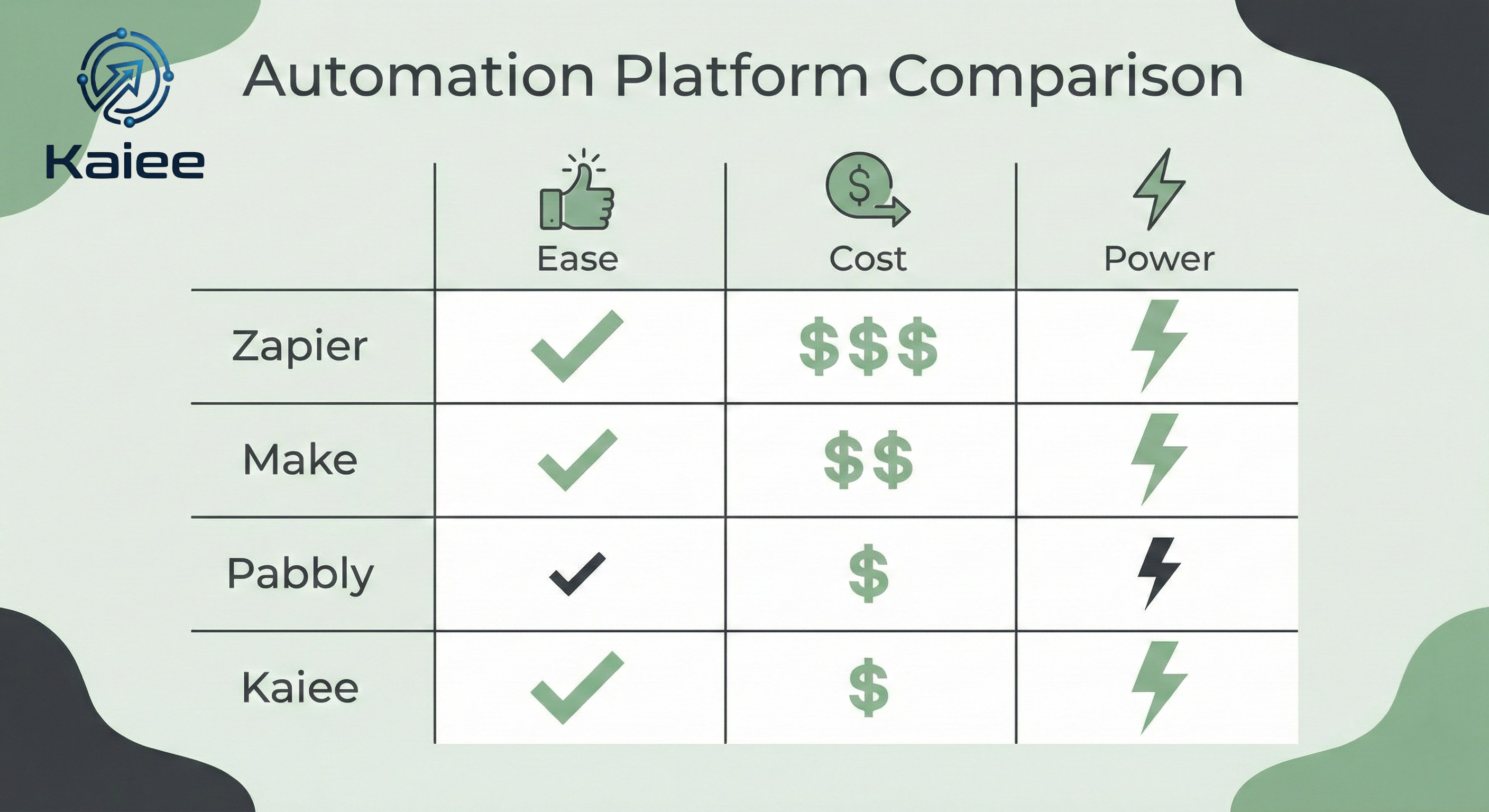
Part 3: Zapier vs Make (The Head-to-Head)
When choosing workflow automation tools small business owners usually debate these two.
| Feature | Zapier | Make (Integromat) |
| Philosophy | Linear (Step 1 -> Step 2) | Visual (Map with Branches) |
| Ease of Use | High (Beginner) | Medium (Intermediate) |
| Pricing | High ($$) | Low ($) |
| Error Handling | Basic | Advanced |
| Best For | Simple connections | Complex Workflows |
Our Advice: Start with Zapier. If your bill exceeds $100/month, switch to Make.
Part 4: 5 Workflows You Should Build Today
Don’t just buy the tool; build the system. Here are 5 blueprints every small business needs:
- The “Lead Instant Response”:
- Trigger: New Form Submission (Website).
- Action 1: Send WhatsApp Welcome Message.
- Action 2: Create Deal in HubSpot.
- Action 3: Slack notification to Sales Team.
- The “Invoice Chaser”:
- Trigger: Invoice Due Date + 1 Day.
- Action: Send polite email reminder via Gmail.
- The “Social Media Matrix”:
- Trigger: New Blog Post Published (WordPress).
- Action: Post link to LinkedIn, Twitter, and Facebook Page automatically.
- The “Review Generator”:
- Trigger: Order Status = “Delivered”.
- Action: Wait 3 days -> Send email asking for a Google Review.
- The “Meeting Logger”:
- Trigger: Calendly event scheduled.
- Action: Create Zoom link -> Add to CRM -> Create Notion page for meeting notes.
Part 5: The “DIY Trap” – Why Tools Aren’t Enough
Here is the hidden problem with workflow automation tools small business buy: You still have to build the logic.
- Buying Zapier is like buying a box of Lego bricks. It doesn’t build the castle for you.
- Many founders spend weekends “fixing broken Zaps” instead of running their business.
Part 6: The “Done-For-You” Alternative (Kaiee)
In 2026, smart businesses are moving from “Do It Yourself” (DIY) to “Done For You” (DFY).
At Vsurgemedia, we built Kaiee to bridge this gap. We don’t just give you a tool; we give you a System.
Why Kaiee is Different:
- Managed Automation: You don’t build the workflow; we do. You just say “Connect my Lead Form to WhatsApp,” and our engineers configure the API logic.
- Edge Case Handling: Generic tools break when data formats change. Kaiee’s AI agents adapt to changes automatically.
- Local Context: Kaiee is optimized for Indian Business workflows (GST Invoicing, WhatsApp-first communication).
Part 7: Frequently Asked Questions (FAQ)
Q1: What is the best free workflow automation tool?
Answer: Make (Integromat) has a very generous free tier (1,000 ops/month). Pabbly also offers a free trial with access to all features. However, for serious business use, expect to pay a small monthly fee.
Q2: Can automation replace my employees?
Answer: No. Automation replaces tasks, not people. It frees your employees from “Robot Work” (data entry) so they can do “Human Work” (sales, strategy, creative).
Q3: Is it difficult to learn automation?
Answer: Tools like Zapier are designed for non-coders. However, understanding “Logic” (If/Then statements) takes practice. If you don’t have time, hiring an agency or using a managed tool like Kaiee is faster.
Q4: Is my data secure when connecting apps?
Answer: Yes. Reputable workflow automation tools small business use (like Zapier) are SOC2 compliant and encrypted. They act as a pipe; they don’t store your data permanently.
Conclusion: Automate or Stagnate
The difference between a stressed business owner and a successful one is often Automation.
Your time is worth ₹5,000/hour. Stop spending it on ₹500/hour tasks.
Investing in the right workflow automation tools small business needs is the highest leverage activity you can do this year.
Ready to stop the grind?
Whether you choose to build it yourself on Zapier or use Kaiee’s Managed Automation, the important thing is to start.
Is your business running on manual mode?
Let’s switch to autopilot.