
By Vsurgemedia | Sales Technology Series
Executive Summary:
If you are a consultant, you know the feeling: You just finished a great discovery call. The client is excited. But now, you have to spend 4 hours in Microsoft Word or Canva wrestling with formatting, pricing tables, and copy just to get a proposal out. By the time you send it, the client’s excitement has cooled down.
In 2026, speed is the ultimate sales weapon. Data shows that proposals sent within 24 hours of a meeting have a 30% higher close rate. To achieve this speed without sacrificing quality, you need the right proposal software for consultants.
This guide moves beyond basic PDF generators. We review the top platforms that track client activity, automate e-signatures, and integrate with your CRM to turn your proposal process into a revenue engine.

Part 1: The “PDF Attachment” is Dead
Before we review the tools, we must address why the “Old Way” is killing your conversion rate.
Sending a static PDF attachment via email is a black hole.
- No Analytics: You don’t know if they opened it.
- No Interactivity: They can’t click to “Accept” or choose “Option B.”
- Mobile Fail: PDFs look terrible on a CEO’s iPhone.
Modern proposal software for consultants creates “Web-Based Proposals.” These look like microsites, adapt to mobile screens, and allow clients to sign instantly.
Part 2: Top Proposal Software for Consultants (2026 Reviews)
We evaluated 15+ platforms based on Design Quality, Tracking Metrics, and CRM Integration.
1. PandaDoc (The Industry Standard)
The Verdict: The most balanced tool on the market. If you want reliability and robust features, start here.
- Pros:
- Content Library: Save your “About Us” and “Case Studies” as blocks. Drag and drop them to build a proposal in minutes.
- Tracking: See exactly how much time a client spent on the “Pricing” page. (Crucial for negotiation).
- Payments: Collect the deposit instantly via Stripe right inside the proposal.
- Cons:
- Design Limits: It creates clean, professional docs, but isn’t as “artistic” as Canva.
- Cost: Advanced CRM integrations (Salesforce) are locked behind expensive tiers.
- Best For: Sales teams and established consultancies.
2. Proposify (The Designer’s Choice)
The Verdict: If you are a branding or design consultant, your proposal needs to look beautiful. Proposify allows for InDesign-level control.
- Pros:
- Typography: Full control over fonts, layout, and images.
- Variables: Automatically replace
[Client Name]throughout the doc to avoid typos. - Video: Embed a Loom video directly into the proposal to explain your pricing personally.
- Cons:
- Learning Curve: The editor can be buggy and complex for non-designers.
- Load Time: Heavy proposals can sometimes load slowly for clients.
- Best For: Creative Agencies and Marketing Consultants.
3. Qwilr (The Webpage Builder)
The Verdict: Qwilr doesn’t make documents; it makes webpages. This is the future of proposal software for consultants.
- Why it wins: It feels like sending a landing page.
- Pros:
- Interactive Pricing: The client can toggle a switch to add “Optional Services” (upselling themselves) and the total updates automatically.
- Mobile First: Looks perfect on any device.
- Analytics: Deep heatmaps of reader behavior.
- Cons:
- Not Print Friendly: Hard to print as a PDF if a client demands a hard copy.
- Best For: SaaS Consultants and Tech firms.
4. Better Proposals (The Simplicity King)
The Verdict: If you hate tech and just want to send a proposal in 5 minutes, this is it.
- Pros:
- Speed: The fastest editor we tested.
- Templates: Excellent library of pre-written templates for SEO, Coaching, and Web Design.
- Price: Very affordable for freelancers.
- Cons:
- Limited Customization: You are stuck with their layout grid.
- Best For: Freelancers and Solo Consultants.
5. HoneyBook (The All-in-One)
The Verdict: More than just proposals; it manages your entire client flow.
- Pros:
- The “Smart File”: Combines the Brochure, Proposal, Contract, and Invoice into one smooth flow.
- Automation: Automatically sends a “Thank You” email after signing.
- Cons:
- Walled Garden: Doesn’t integrate as well with external CRMs like HubSpot.
- Best For: Event Planners, Photographers, and Coaches.
Part 3: PandaDoc vs Proposify (Head-to-Head)
When choosing proposal software for consultants, the battle often comes down to these two.
| Feature | PandaDoc | Proposify |
| Editor Style | Document-Based (Word-like) | Design-Based (InDesign-like) |
| Ease of Use | High (Simple) | Medium (Complex) |
| Analytics | Excellent | Good |
| Interactive Pricing | Basic | Advanced |
| Price | $$ | $$$ |
Our Take: Choose PandaDoc for speed and sales teams. Choose Proposify if design is your main selling point.
Part 4: The “Template Trap” (Why Software isn’t Enough)
Buying the best proposal software for consultants won’t help if your content is bad.
Common mistakes include:
- talking about yourself first: Your proposal should start with the Client’s Problem, not your history.
- Confusing Pricing: Use a “Good, Better, Best” pricing table (psychological anchoring).
- No Next Steps: Always end with a clear “Sign Here to Start” button.
Part 5: The New Alternative – Custom AI Automation (Kaiee)
In 2026, smart consultants aren’t just using software to send proposals; they are using AI to write them.
At Vsurgemedia, we use our engine, Kaiee, to automate the creation process entirely.
How Kaiee Supercharges Proposals:
- Meeting to Draft: You finish a Zoom call. Kaiee transcribes the notes, extracts the pain points, and auto-fills your PandaDoc/Qwilr template.
- Dynamic Pricing: Based on the client’s industry (from CRM data), Kaiee selects the correct pricing package automatically.
- Auto-Follow Up: If the client opens the proposal but doesn’t sign in 24 hours, Kaiee sends a personalized WhatsApp/Email nudge.
Why Custom Automation Wins:
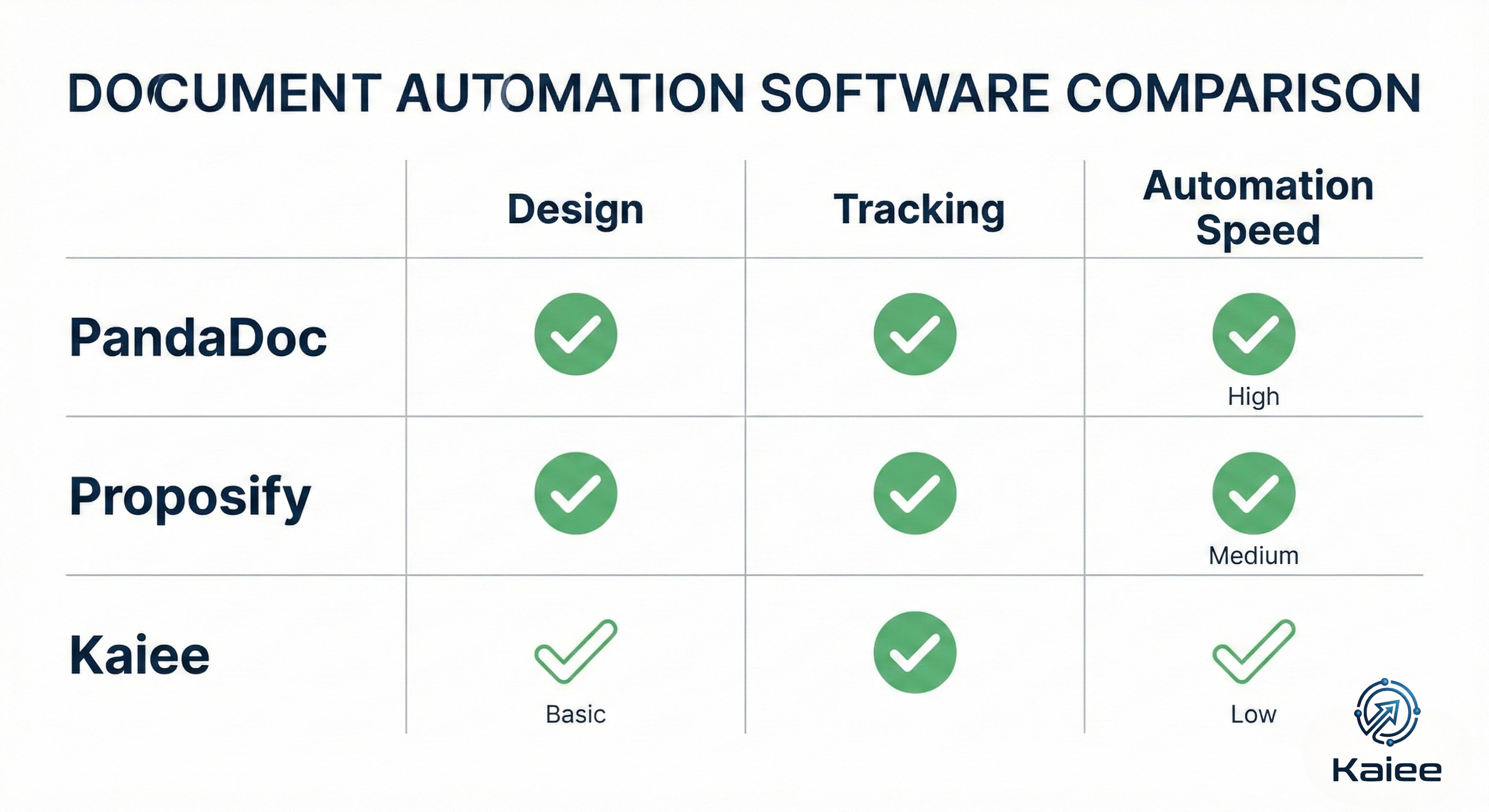
- Zero Admin Time: You don’t write proposals; you just review them.
- Instant Turnaround: Send the proposal 5 minutes after the call ends (Maximum psychological impact).
Part 6: Implementation Guide – Your First Month
Week 1: Audit Your Assets
Gather your best case studies, testimonials, and pricing sheets. Clean them up.
Week 2: Choose the Tool
Sign up for a trial of PandaDoc or Qwilr. Don’t overthink it; pick one that fits your workflow.
Week 3: Build the “Master Template”
Create one template that covers 80% of your needs. Use “Tokens” or “Variables” for [Client Name] and [Company Name].
Week 4: Connect the Pipes
Integrate the software with your CRM (HubSpot/Pipedrive). Ensure that when a deal moves to “Proposal Sent,” the software triggers automatically.
Part 7: Frequently Asked Questions (FAQ)
Q1: Is proposal software worth the cost for a freelancer?
Answer: Yes. If a tool costs $50/month but helps you close just one extra deal a year due to professionalism and follow-up tracking, it pays for itself 100x over.
Q2: Can I use e-signatures legally?
Answer: Absolutely. Tools like PandaDoc and DocuSign provide legally binding ESIGN and UETA compliant signatures, which are often more secure than wet signatures.
Q3: How do I stop proposals from going to Spam?
Answer: Modern proposal software for consultants sends the proposal via a secure link (URL) rather than an attachment. This bypasses spam filters and looks cleaner.
Q4: What is the best free proposal software?
Answer: Canva allows you to create beautiful PDFs for free, but it lacks e-signature and tracking capabilities. For a free tier with signing, check out HelloSign (now Dropbox Sign) combined with Google Docs, though it is manual.
Conclusion: Stop Writing, Start Closing
Your proposal is the final bridge between a prospect and a paycheck. Don’t let a messy Word document burn the bridge.
Investing in professional proposal software for consultants buys you Authority and Speed.
Don’t let administrative work slow down your growth.
Whether you choose a SaaS tool like PandaDoc or build a custom AI drafting engine with Kaiee, the goal is the same: Spend less time typing and more time consulting.
Is your sales process too slow?
Let’s automate your closing workflow.
👉 Book a Sales Automation Audit with Vsurgemedia
Saurav Patel
SEO/GEO Specialist | Vsurgemedia