
By Vsurgemedia | Remote Work Technology Series
Executive Summary:
time tracking software for remote teams
Managing a remote team is built on one currency: Trust. But “Trust” doesn’t pay the bills; “Output” does. In 2026, the market for time tracking software for remote teams has split into two camps: tools that spy on employees (taking screenshots, tracking mouse movement) and tools that empower them (logging billable hours, analysing workflow).
Choosing the wrong side can destroy your company culture. A Gartner survey revealed that while 60% of large employers use monitoring tools, employee satisfaction drops by 45% when they feel “watched.” This guide provides a comprehensive review of the top platforms, helping you balance data visibility with employee privacy.

Part 1: The “Big Brother” Problem in Remote Work
Before we compare software, we must address the elephant in the room. Why do you need time tracking?
- Scenario A (Billing): You are an agency. You bill clients by the hour. You need proof of work. (Legitimate Need).
- Scenario B (Trust Issues): You are worried your remote developer is watching Netflix instead of coding. (Management Issue).
The best time tracking software for remote teams solves Scenario A without triggering the cultural toxicity of Scenario B.
The 3 Categories of Tools:
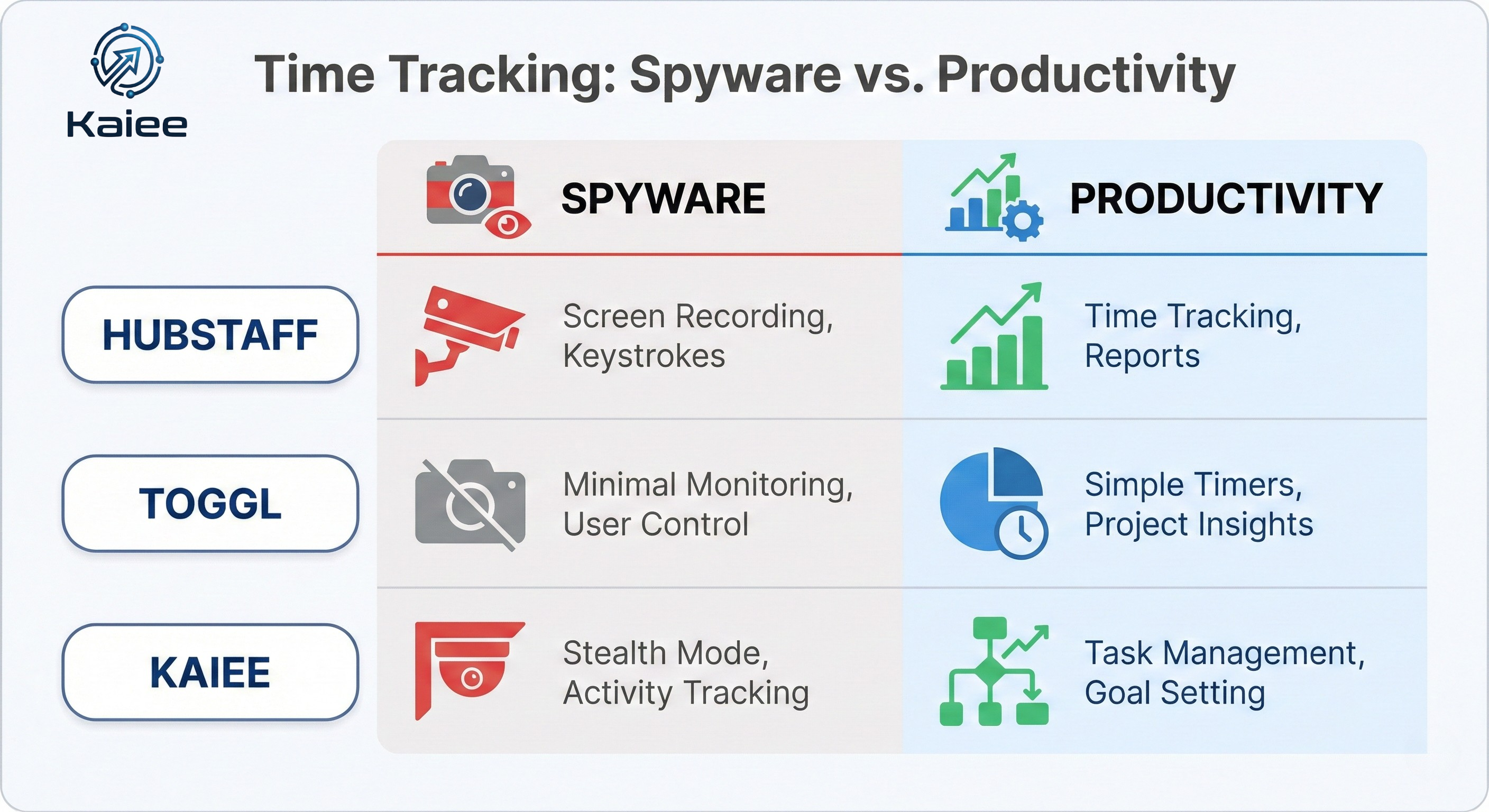
- The Spies: Take screenshots, track URLs, record keystrokes. (e.g., Time Doctor).
- The Loggers: Simple start/stop timers. (e.g., Toggl).
- The Automators: AI tools that track output, not hours. (e.g., Kaiee).
Part 2: Top Time Tracking Software for Remote Teams (Reviews)
We evaluated 20+ tools based on Privacy, Integration, and Ease of Use.
Category A: Best for Agencies & Freelancers (The “Loggers”)
1. Toggl Track (The User Favourite)
The Verdict: If you hate time tracking, you will tolerate Toggl. It is the cleanest, least intrusive tool on the market.
- Pros:
- One-Click Timer: Works across browsers, mobile, and desktop.
- Anti-Surveillance: No screenshots. No spying. Purely for billing.
- Reporting: Beautiful visuals that clients love to see on invoices.
- Cons:
- Manual: Relies on employees remembering to click “Start.”
- Cost: Enterprise features can get expensive ($18/user).
- Best For: Creative agencies and software houses that trust their team.
2. Harvest (The Billing Machine)
The Verdict: The gold standard for turning “Time” into “Money.”
- Pros:
- Invoicing: Automatically turns tracked hours into Stripe/PayPal invoices.
- Budgeting: Alerts you when a project burns 80% of its budget.
- Integration: Syncs perfectly with Asana and Slack.
- Cons:
- Rigid: Hard to edit time entries if you make a mistake.
- Best For: Service businesses that bill hourly.
Category B: Best for Accountability (The “Monitors”)
3. Hubstaff (The Field Manager)
The Verdict: Powerful for teams that need proof of location or activity levels.
- Pros:
- GPS Tracking: Essential for field sales or logistics teams.
- Activity Levels: Calculates keyboard/mouse usage percentage.
- Payroll: Automates payments based on hours logged.
- Cons:
- Intrusive: Can feel like micromanagement if GPS is used on desk workers.
- UI: Slightly clunky compared to Toggl.
- Best For: Construction, Logistics, and Field Sales.
4. Time Doctor (The Productivity Forensic)
The Verdict: The most robust time tracking software for remote teams that need deep analytics.
- Pros:
- Screenshots: Optional feature to take screen captures every 10 mins.
- Distraction Alerts: “Are you still working?” pop-ups if you visit Facebook.
- Client Login: Give clients a “White Label” view of the work.
- Cons:
- Morale Killer: High risk of employee churn if implemented without consent.
- Best For: BPOs and hourly contractors where strict compliance is needed.
Part 3: The “Hidden Cost” of Time Tracking
While these tools promise efficiency, they often create “The Hawthorne Effect”—employees change their behavior just because they are being watched.
The Risks of “Spyware” Tools:
- Mouse Jigglers: Employees buy physical devices to fake activity, rendering your data useless.
- Burnout: Staff skips breaks to keep their “Activity Score” high.
- Legal Risk: Privacy laws in Europe (GDPR) and California (CCPA) are strictly regulating remote employee monitoring tools.
Part 4: The Comparison Matrix (2026 Edition)
| Feature | Toggl Track | Hubstaff | Time Doctor | Kaiee (Automation) |
| Tracking Type | Manual Timer | GPS/Activity | Screenshots | Output/Event Based |
| Privacy | High | Low | Low | High |
| Integrations | 100+ | 30+ | 60+ | Custom API |
| Employee Vibe | “Helpful” | “Watching” | “Policing” | “Invisible” |
| Cost | $$ | $$$ | $$$ | **$$ (Value Based)** |
Part 5: The New Alternative – Outcome-Based Tracking (Vsurgemedia/Kaiee)
In 2026, smart founders are asking: “Why do I care how many hours you worked? I care what you finished.”
Instead of buying time tracking software for remote teams that watches the clock, consider Workflow Automation.
Introducing Kaiee (The AI Approach):
At Vsurgemedia, we use our engine, Kaiee, to track work, not time.
How It Works:
- Sales Team: We don’t track their hours. We track their “WhatsApp Activity” via Kaiee. Did they reply to the lead? Yes/No.
- Support Team: We don’t screen-record. We track “Ticket Resolution Time” via API.
- Result: You get a dashboard of Productivity, not just “Hours Logged.”
Why This Wins:
- Zero Friction: Employees don’t have to click “Start/Stop.”
- 100% Accuracy: Data comes from the CRM/WhatsApp, not self-reported timesheets.
- Culture Safe: No spying. Only metric tracking.
Part 6: How to Choose the Right Tool (Implementation Guide)
Step 1: Define the Goal
- If you need to bill a client: Use Harvest.
- If you need to ensure a security guard is on-site, use Hubstaff.
- If you need to know if sales are happening: Use Kaiee.
Step 2: The “Transparency Talk”
Never install time tracking software for remote teams silently. Hold a town hall. Explain why you are doing it (e.g., “To ensure we bill clients correctly,” not “To catch you slacking”).
Step 3: The Pilot
Run the tool with the management team first for 2 weeks. If you hate it, your employees will definitely hate it.
Part 7: Frequently Asked Questions (FAQ)
Q1: Is it legal to take screenshots of employees?
Answer: In the US, generally yes on company-owned devices. In the EU (GDPR) and India (DPDP Act), it is a grey area requiring explicit consent. Always consult a lawyer before enabling employee productivity tracking and ethical features like screenshots.
Q2: Can time tracking software detect “Mouse Jigglers”?
Answer: Tools like Time Doctor claim to detect artificial activity patterns, but hardware jigglers are getting smarter. The only way to beat a jiggler is to track Output (Results) instead of Input (Mouse movement).
Q3: Does tracking software integrate with Slack?
Answer: Yes. Most tools like Toggl and Harvest allow you to start/stop timers directly via Slack commands (/toggl start).
Q4: What is the best free time tracker?
Answer: Clockify offers a robust free tier for unlimited users, though its reporting features are locked behind a paywall.
Conclusion: Don’t Manage Time, Manage Energy

The best time tracking software for remote teams is the one your team actually uses without resentment.
If you treat your remote team like adults, they will work like professionals. If you treat them like suspects, they will work like prisoners.
Are you measuring the wrong metric?
Stop counting hours. Start automating outcomes.