
By Vsurgemedia | Legal Technology Series
Executive Summary: The legal industry has historically been slow to adopt technology, clinging to on-premise servers and physical “Redweld” files. However, 2026 marks a tipping point. With the rise of hybrid work and client demands for transparency, adopting the right cloud collaboration tools legal firms rely on is no longer optional—it is inevitable.
But for a law firm, moving to the cloud isn’t just about downloading an app. It involves navigating a minefield of ethics rules regarding confidentiality. This guide provides an exhaustive review of the best cloud collaboration tools legal firms are using in 2026 to stay compliant and profitable.

Part 1: The “Billable Hour” Leak and Cloud Collaboration Tools
Why are Am Law 100 firms migrating to the cloud? The answer lies in the leakage of billable hours.
The Cost of Inefficiency
Consider the traditional workflow: An associate drafts a contract. They email it to a partner. The partner edits it and emails it back. The client emails their version. Result? Version Control Hell. Data suggests that without proper cloud collaboration tools legal firms waste up to 3 hours per week managing document versions. At a billable rate of $400/hour, that is a loss of **$60,000 per lawyer, per year**.
The “Shadow IT” Risk
If the firm does not provide modern cloud collaboration tools legal firms need, lawyers will find their own insecure workarounds like personal WhatsApp or Gmail. This is “Shadow IT,” and it is a malpractice lawsuit waiting to happen. The only way to stop it is to provide enterprise-grade systems that are easier to use than consumer apps.
Part 2: The Security & Ethics Checklist (Law Firm Cybersecurity 2026)
Before evaluating any software, it must pass the “Legal-Grade” test. In the context of law firm cybersecurity 2026, your tech stack must meet these 4 pillars:
1. End-to-End Encryption (E2EE)
Standard encryption isn’t enough. The best cloud collaboration tools legal firms trust offer E2EE, meaning even the cloud provider cannot unlock your files. Only you hold the key.
2. Data Residency (Sovereignty)
If your client is in the EU (GDPR) or California (CCPA), their data cannot just “float” anywhere. Your tools must allow you to pin data to specific geographic servers.
3. Matter-Centric Architecture
Generic tools organize files by “Date.” Legal-grade tools organize everything by Matter Number. When reviewing cloud collaboration tools legal firms, check if they offer a “Matter-Centric” view.
4. Ethical Walls
In large firms, conflicts of interest are common. The software must allow you to “Wall Off” specific folders so that lawyers involved in a conflict strictly cannot access related files.
Part 3: In-Depth Reviews of Top Cloud Collaboration Tools
We have categorized the market leaders into three tiers: Document Management, Practice Management, and Secure Sharing.

Category A: Legal Document Management Software
1. NetDocuments (The Document Fortress)
Best For: Litigation Firms and Corporate Law.
- Overview: NetDocuments is widely considered the premier legal document management software for security-conscious firms. It is a pure-play DMS that protects documents better than anyone else.
- Key Features:
- ndThread: A chat feature built inside the document.
- Governance: Granular permission controls that are audit-ready.
- The Verdict: When evaluating cloud collaboration tools legal firms for heavy discovery, NetDocuments is the gold standard.
Category B: Best Legal Practice Management Software
2. Clio (The Operating System for Law)
Best For: Small to Mid-sized Firms looking for an all-in-one solution.
- Overview: Clio is frequently cited as the best legal practice management software for its ease of use. It integrates billing, calendaring, and documents in one hub.
- Key Features:
- Clio for Clients: A secure portal where clients can message you.
- Integration: Connects with Zoom and Outlook effortlessly.
- The Verdict: A fantastic entry point for firms modernizing their stack.
Category C: Secure File Sharing for Lawyers
3. Citrix ShareFile (The Client Interface)
Best For: Sending massive files like video evidence.
- Overview: Email has a 25MB limit. For secure file sharing for lawyers, ShareFile allows gigabytes of transfer with bank-level encryption.
- Key Feature: The Outlook Plugin allows you to convert attachments into secure links instantly.
4. Microsoft Teams (The Default Choice)
Best For: Internal communication. While Teams is ubiquitous, it requires configuration to be one of the safe cloud collaboration tools legal firms can use. You must enable retention policies to minimize discovery liability.
Part 4: The Hidden Dangers of “Free” Tools
Why not just use Google Drive? While Google Workspace Enterprise is compliant, the free version is data-mined for ads. Using a free tool for client data is an ethics violation. You must invest in paid cloud collaboration tools legal firms are authorized to use, which come with a signed Business Associate Agreement (BAA).
Part 5: Automation – The Next Frontier (Vsurgemedia & Kaiee)
Tools like Clio store your data, but who moves your data? In 2026, the competitive advantage isn’t just using cloud collaboration tools legal firms have; it is Cloud Automation.
Many firms still employ paralegals to manually copy-paste data from emails into the software. This is inefficient.
The Solution: Custom AI Agents (Built by Vsurgemedia) We help law firms build custom automation layers on top of these tools using our engine, Kaiee.
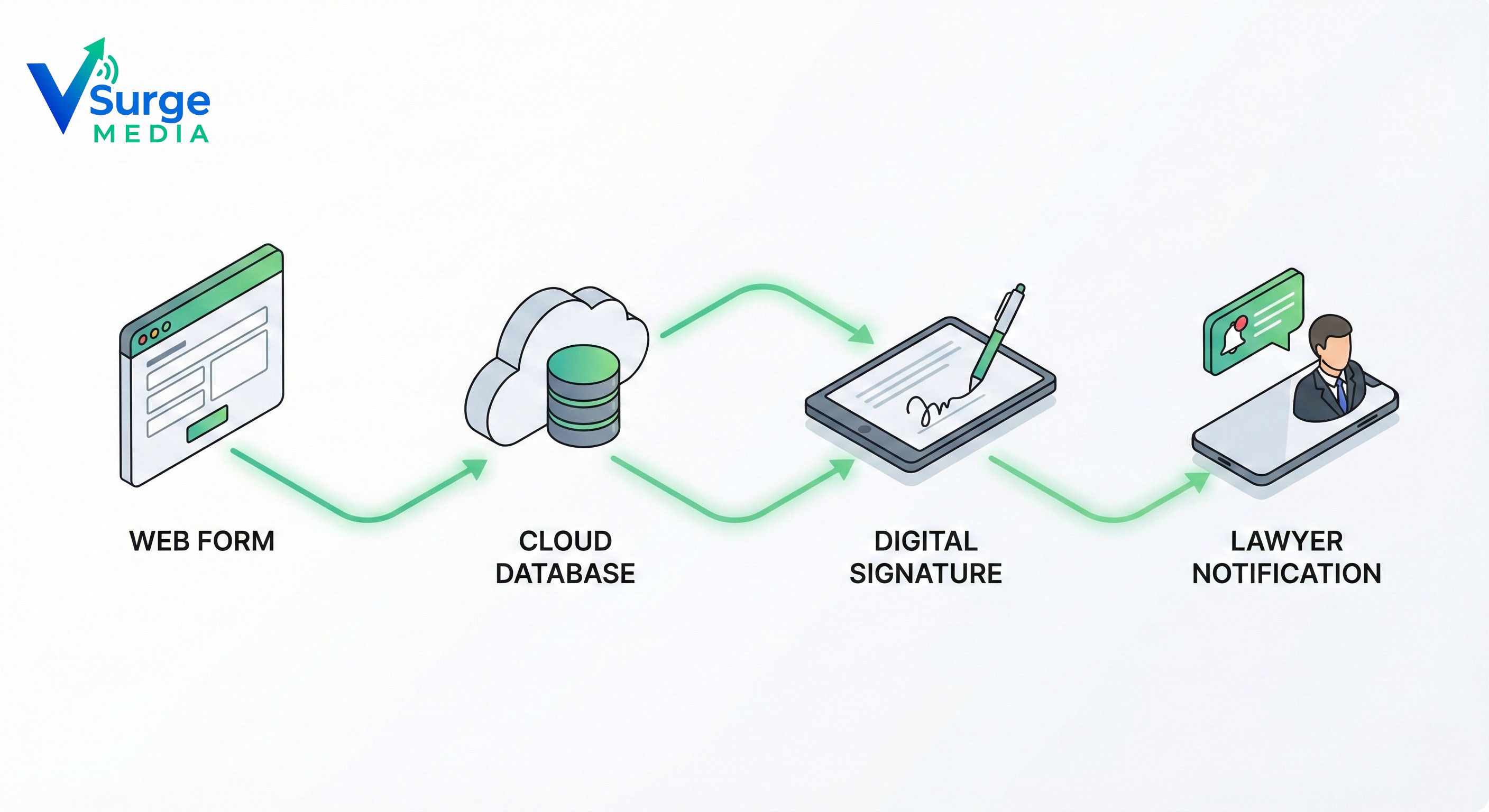
Use Case: Automated Client Intake
- Trigger: A client fills out a form.
- Action: Kaiee creates a Matter in Clio.
- Action: Kaiee creates a secure folder in NetDocuments.
- Action: Kaiee emails an NDA via DocuSign.
Result: Zero human touches. 100% accuracy.
Part 6: Comparison – Clio vs NetDocuments
A common question we get is: “Which is better?” Here is a breakdown of Clio vs NetDocuments to help you decide.
| Feature | Clio Manage | NetDocuments |
|---|---|---|
| Primary Category | Best Legal Practice Management Software | Legal Document Management Software |
| Matter-Centric? | Yes | Yes (Native) |
| Client Portal | Excellent | Good |
| Focus | Billing & Admin | Security & Documents |
| Ideal For | Small-Mid Firms | Large/Corporate Firms |
Usually, firms don’t choose between them; they integrate them. Using both provides the ultimate stack of cloud collaboration tools legal firms need.
Part 7: A 4-Step Migration Strategy
Moving a law firm to the cloud is like changing the engine of a car while driving it. You cannot afford downtime.
Phase 1: The Audit Identify “Dark Data” on local desktops. Map out which cloud collaboration tools legal firms in your specific practice area are using.
Phase 2: The Pilot Do not migrate the whole firm at once. Pick one practice area to test the new system.
Phase 3: The Training Conduct mandatory workshops. Show staff how secure file sharing for lawyers protects them from malpractice.
Phase 4: The Cutover Move the data over a weekend so Monday morning is ready to go.
Conclusion: Security is the New Rainmaker

In the past, clients hired law firms for their legal brains. In 2026, corporate clients audit their law firms’ security before hiring them.
If you are still using on-premise servers, you are losing clients. Investing in the right cloud collaboration tools legal firms use is an investment in your firm’s revenue and reputation.
Is your firm’s tech stack an asset or a liability? Stop leaking billable hours. Start automating your workflow.